

Living in the UAE as an NRI means juggling many responsibilities, and staying on top of your LIC Payment Online is one of them. Missing a premium can lead to unwanted penalties or even risk your policy benefits. This guide will walk you through simple, reliable steps to pay your LIC premium online from the UAE, so you can keep your policy active without any hassle.
As an NRI living in the UAE, you have your own set of responsibilities, and one of them is to keep up with your LIC premium payments back in India. Missing a due date can mean losing policy benefits or paying late fees, so staying on top of it is crucial.
Why LIC Premium Payment Is Important for NRIs in UAE
For many NRIs in the UAE, an LIC policy is more than just an investment. It’s a safety net for loved ones back home, a way to secure their future, and a commitment you don’t want to miss. Paying premiums on time ensures your policy stays active, so your family is protected no matter where you are.
Travelling to India just to make a payment isn’t practical when you have a busy schedule abroad. Missing deadlines can lead to penalties or even policy lapses, which can be stressful and costly to fix. That’s why knowing the right online payment methods is so important. It helps you stay on track with your commitments, avoid last-minute panic, and maintain peace of mind.
How to Pay LIC Payment Online from UAE
Paying your LIC premium from the UAE is easy if you know the right platforms and follow the correct steps. Here’s a breakdown for each method.
Using LIC’s Official Website
- Visit the LIC India official website.
- Go to the “Pay Premium Online” section.
- Choose “Pay Direct” for quick payment without login, or use your LIC account for more options.
- Enter your policy number, date of birth, and other details.
- Select your payment method (net banking, credit card, or debit card).
- Complete the payment and download the receipt for your records.
Tips: Always double-check your policy number before confirming the payment to avoid errors.
Using HDFC Credit Card
- Log in to your HDFC Bank NetBanking or HDFC Credit Card portal.
- Go to the “Bill Pay and Recharge” section.
- Search for “Life Insurance Corporation of India” in the biller list.
- Enter your policy details exactly as they appear in LIC records.
- Choose the payment amount and confirm.
- Save the transaction reference number for proof.

Tips: Paying through your HDFC credit card can help you earn reward points while keeping your policy active.
Through Federal Bank Internet Banking (FedNet)
- Log in to your FedNet account.
- Go to the “Payments” or “Bill Pay” section.
- Add LIC as a registered biller by entering your policy number.
- Confirm the biller details and proceed to payment.
- Authorize the transaction with a One Time Password (OTP) or net banking password.
Tips: Once registered, you can set up auto-pay to avoid missing premium due dates.
Via Policybazaar Platform
- Visit the Policybazaar website or mobile app.
- Select “Pay LIC Premium” from the menu.
- Enter your policy number, date of birth, and premium amount.
- Choose your preferred payment method (cards, UPI, net banking).
- Confirm and complete the transaction.
Tips: Policybazaar may offer reminders for your next premium date if you create a free account.
Key Tips for Paying LIC Premiums from the UAE
Paying your LIC premium from abroad needs a bit of care to avoid any hiccups. Here are some key points to keep your payments smooth and stress-free:
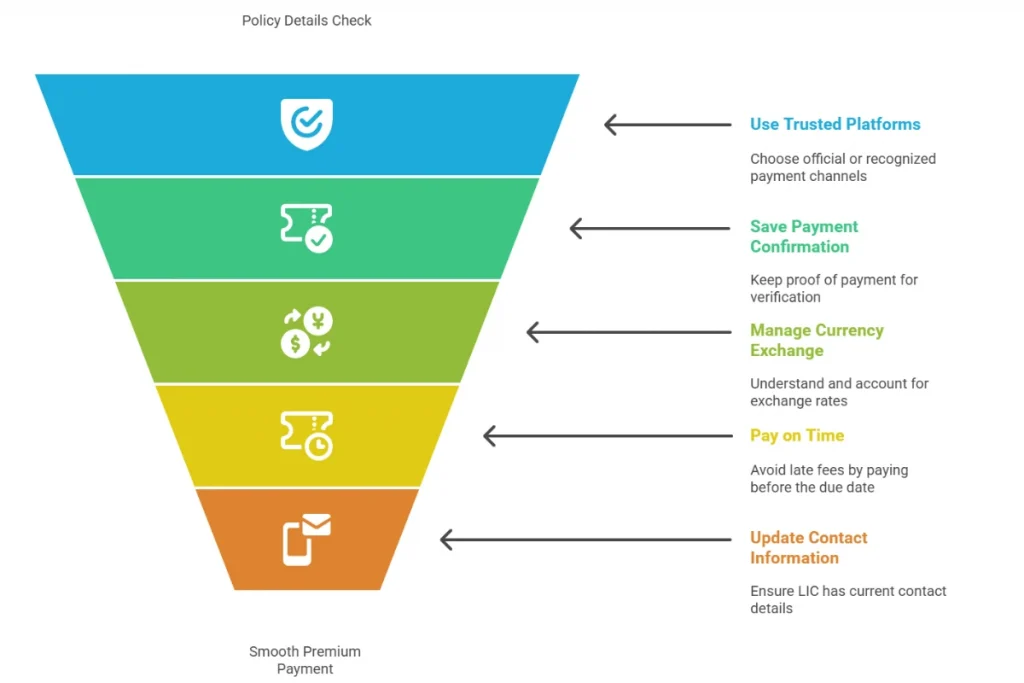
1. Double-Check Your Policy Details
Before you hit pay, make sure your policy number, name, and date of birth are correct. Small errors can cause delays or payment failures.
2. Use Trusted Platforms Only
Stick to official LIC portals, recognized banks, or reputed platforms like Policybazaar and Federal Bank’s FedNet. Avoid unfamiliar websites to keep your details safe.
3. Keep a Payment Receipt or Confirmation
Always save or screenshot your payment confirmation. This acts as proof if you ever need to clarify with LIC or your bank.
4. Mind the Currency and Exchange Rates
Since you’re paying from the UAE, your payment might involve currency conversion. Check the rates and any extra charges your bank or payment provider might apply.
5. Timing Matters
Pay your premiums before the due date to avoid any late fees or policy lapses. Setting up autopay, where possible, can take this worry off your plate.
6. Customer Support Can Help
If you face any issues, contact LIC’s customer service or your payment platform’s help desk quickly. Early action helps resolve problems before deadlines.
7. Keep Your Contact Information Updated
Ensure LIC has your current email and phone number to receive payment reminders and policy updates without missing a beat.
For faster and safer premium payments, explore our list of Top Online Payment Gateways in the UAE to find the best option for your LIC transactions.
Common Issues and How to Fix Them
Paying your LIC premium online from the UAE is usually straightforward, but sometimes things don’t go as planned. Here are a few common hiccups and how to handle them:

Payment Didn’t Go Through
If your payment fails, the first thing to do is check your details, make sure your policy number and card info are correct. Sometimes banks block international payments for security reasons, so give your bank a quick call to clear things up. Often, waiting a little while and trying again works too.
Extra Currency Conversion Fees
Because you’re paying in Indian rupees from the UAE, your bank or payment service might charge conversion fees. These can be a percentage or a small fixed amount. It’s smart to check these charges beforehand so you’re not caught off guard.
Payment Platform Isn’t Working
If the website or app gives you errors or freezes, try refreshing or switching to a different browser. If it’s still acting up, wait a bit and try later. You can also reach out to customer support—they’re usually helpful and can guide you through.
Shopping online with a debit card is simple once you know the process. Read our How to Buy Things Online with a Debit Card in UAE guide for clear, safe payment steps.
FAQs: LIC Premium Payment for NRIs in the UAE
How to Pay LIC Payment Online?
Visit LIC’s official website or trusted portals like Policybazaar, enter your policy details, choose a payment method, and complete the secure transaction.
How to Make HDFC Credit Card Payment Online?
Log in to HDFC net banking or credit card portal, select LIC under bill payments, enter your policy number and amount, then confirm the payment.
How to Make LIC Payment Online?
Use LIC’s site, Federal Bank’s FedNet, or Policybazaar, enter your policy and personal details, select a payment mode, and complete the transaction securely.
How long does it take for the payment to reflect?
Payments usually show up instantly or within a few hours, but sometimes it can take 1-2 business days to reflect in your LIC account.
Can I set up auto-payment from the UAE?
Yes, many banks and payment platforms let you set up autopay to avoid missed payments and keep your policy active without manual effort.
Are there extra charges for using a UAE credit card?
You might face currency conversion or international transaction fees, so check with your bank about any extra charges before paying.
