


Buying things online has never been easier, and for many people, the debit card is their go-to payment method. It’s simple, straightforward, and directly connected to your bank account with no extra credit lines, no monthly bills to worry about. With a debit card, you’re spending money you already have, which makes it easier to stick to a budget.
This blog helps you how to buy things online with a debit card, offers the convenience of online shopping without the complexity of credit, making it the perfect choice for everyday purchases.
What You Need Before Buying Online with a Debit Card
Before you click “buy now,” make sure you have a few basics in place. It’ll save you time and help your best things to buy in Dubai go through without a hitch.
1. An active debit card (Visa or Mastercard)
Your card needs to be valid and activated for online transactions. Most banks automatically enable this, but if you’ve never used your card online before, it’s worth checking with your bank. Both Visa and Mastercard debit cards are widely accepted by online stores around the world.
2. Sufficient balance in your account
A debit card pulls funds straight from your bank account. That means you need to have enough money available to cover the purchase amount, including any shipping fees or taxes. If your balance is low, the transaction will likely be declined.
3. Internet access and a secure device
While you’re shopping on your phone or computer, make sure you have a stable internet connection. Equally important—shop from a device you trust, with updated antivirus software or security features enabled. This helps protect your card details from potential online threats.
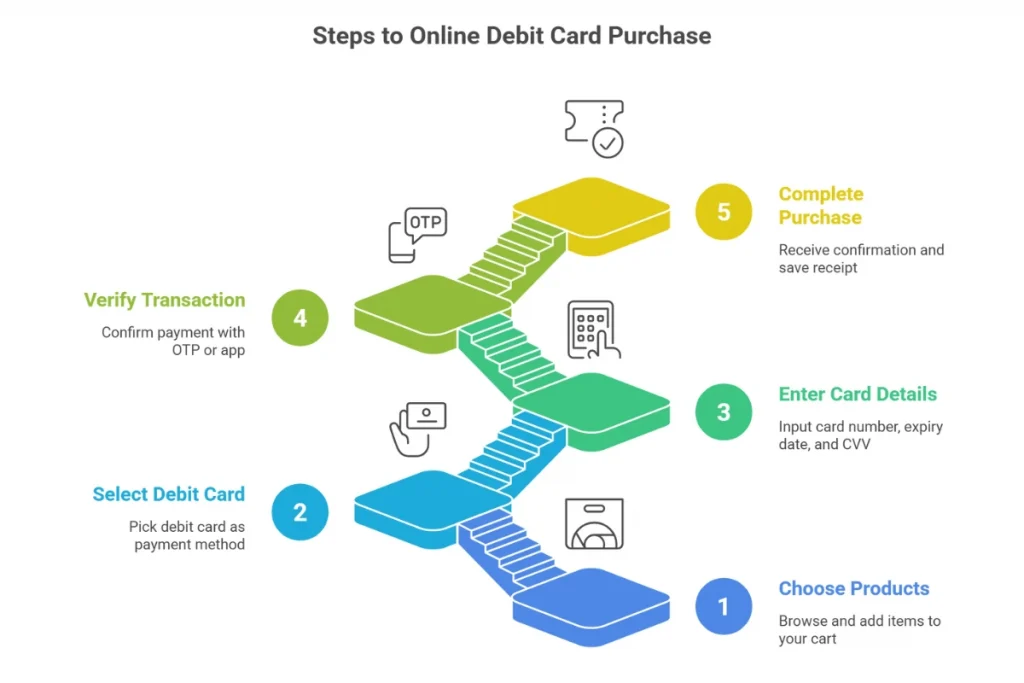
Step-by-Step Guide to Buying Things Online with a Debit Card
Paying for your purchase online with a debit card is quick once you know the process. Here’s a simple guide to get it right every time.
Step 1: Choose your products and proceed to checkout
Browse the online store, add the items you want to your shopping cart, and review them before moving on. When you’re ready, click the checkout button to start the payment process.
Step 2: Select debit card as your payment method
On the payment page, you’ll see different options as credit card, debit card, PayPal, and so on. Pick the debit card option, usually labelled as “Visa Debit” or “Mastercard Debit.”
Step 3: Enter your debit card details
Type in the 16-digit card number printed on the front of your card, the expiry date (MM/YY), and the CVV security code from the back. Double-check each field to avoid errors that could delay your purchase.
Step 4: Verify your transaction
Most banks will ask you to confirm the payment through a one-time password (OTP) sent by SMS or a prompt in your banking app. Enter the code or approve the request to continue.
Step 5: Complete your purchase and keep your receipt
Once your payment is approved, the store will display a confirmation page or send you an email. Save it for your records—it’s proof of purchase and will help in case of any order issues.
Common Mistakes to Avoid When Using a Debit Card Online
Using a debit card for online shopping is simple, but a few small mistakes can lead to declined payments, delays, or even security risks. Here are the most common errors to watch out for, especially for shoppers in the UAE.
1. Not checking if your card is enabled for online payments
Some UAE banks require you to activate online transactions before you can use your debit card on e-commerce sites. Skipping this step means your payment will fail every time.
2. Ignoring extra charges
International websites may charge in foreign currency, and your bank could add conversion fees. It’s best to check the total cost in AED before confirming the payment.
3. Entering incorrect details
A single mistake in your card number, expiry date, or CVV can stop the payment from going through. Always review your details before pressing “Pay.”
4. Shopping on unverified websites
In the UAE, online scams still happen. Avoid sites with no clear contact information, poor reviews, or unrealistic offers.
5. Using public Wi-Fi for payments
Transactions made over unsecured public networks are more vulnerable to hacking. Stick to your home internet or mobile data connection for purchases.
6. Not monitoring your bank account after shopping
It’s smart to check your account balance or banking app after making a purchase. This helps you confirm the payment and spot any suspicious transactions early.
FAQs About Using Debit Cards for Online Shopping
Can I use any debit card to shop online in the UAE?
Most Visa and Mastercard debit cards issued by UAE banks work for online purchases. Check with your bank if your card is enabled for online transactions.
What if my debit card payment gets declined?
Common reasons include insufficient funds, incorrect card details, or the card not being activated for online use. Contact your bank to resolve these issues.
Is it safe to enter my debit card details on any website?
Only shop on secure and trusted websites. Look for “https://” in the URL and positive customer reviews before making a payment. Avoid using public Wi-Fi when entering card details.
How does OTP verification work for debit card payments?
After entering your card details, the bank sends a one-time password (OTP) to your registered mobile number. Enter this code to confirm and complete your purchase securely.
Can I use my debit card for international online shopping?
Yes, but keep in mind that currency conversion fees and additional charges may apply. Make sure your card is enabled for international transactions.
What should I do if I notice an unauthorized transaction?
Report it immediately to your bank’s customer service. Most UAE banks have fraud protection policies and will guide you through dispute resolution.
